Saturday, 29 March 2014

How to make unlimited coins in Subway Surfers Newyork City 2014


Hello everyone, 
         Today I am talking about the cheat for subway surfers. In android platform subway surfers is getting top rated game. The main objective of every player is to make a very big high score to beat your friend's high score. For that you need more coins to spend for upgrading character, and some other features and also you need the keys to save the game when you are draped. Don't worry about these things. 
Here have an idea to make all in your hands. how many coins you want? How many keys you want? Everything is your wish.

Follow the below steps to reach the destination

STEP 1: First of all your phone should be rooted. for some device you can use "Frameroot" to root the device . Else some other rooting softwares may use. (Rooting may cause your device and we are not responsible for any kind of misuse.). If you are already rooted then goto step 2.

STEP 2: Download and Install GAME KILLER app.
              Click Here to Download for Android Device.

STEP 3: Open your Game Killer app and now you can see the User Interface, Just minimize the app and open your subway surfers. Top-left  you can see an icon of Game Killer and open it.

STEP 4: In the search area type how much coins you have now. Then click on search button and select AUTO IDENTITY.

STEP5: Now you can see the list of items found. if you found a lot of items then make some changes in your coins and search again, you will get only one or two items found. Then click on it,and change the Value how much coins you want. [give the value as maximum 9 digits]. click ok button and see the magic in your game. 
           Suppose if you want to make more keys same like this, In search area type the keys how much you have.


Labels: , , ,

Saturday, 11 January 2014

How to make a hiding folder windows 7 trick

Keep Folders Hidden- Follow below steps


  • first create a new folder somewhere on your hard drive
  • when you name it hold down "Alt" and press "0160" this will create and invisible space so it will apper as if it has no name.

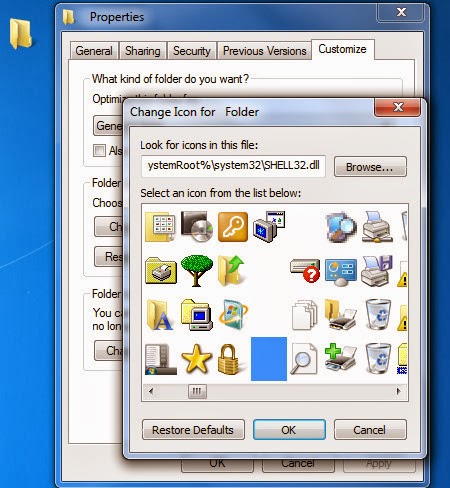
  • then right click in and select "Properties" select the tab "coustimize" and select "change icon" scroll along and you should a few blanc spaces click on any one and click ok when you hav saved the settings the folder will be invisible to hide all your personal files 


Labels: , ,

Friday, 10 January 2014

How to create a huge file in windows

       You can create a file of any size using nothing more than what's supplied with Windows. Start by converting the desired file size into hexadecimal notation. You can use the Windows Calculator in Scientific mode do to this. Suppose you want a file of 1 million bytes. Enter 1000000 in the calculator and click on the Hex option to convert it (1 million in hex is F4240.) Pad the result with zeroes at the left until the file size reaches eight digits—000F4240.

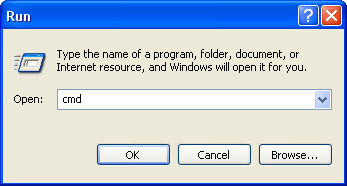
        Now open a command prompt window. In Windows xp, vista, or 7, you can do this by entering COMMAND in the Start menu's Run dialog; in Windows NT 4.0, 2000, or XP enter CMD instead. Enter the command DEBUG BIGFILE.DAT and ignore the File not found message. Type RCX and press Enter. Debug will display a colon prompt. Enter the last four digits of the hexadecimal number you calculated (4240, in our example). Type RBX and press Enter, then enter the first four digits of the hexadecimal size (000F, in our example). Enter W for Write and Q for Quit. You've just created a 1-million-byte file using Debug. Of course you can create a file of any desired size using the same technique.

Labels: , ,

How to speed up windows xp booting

Boot Winxp Fast

Follow the below steps

1. Open notepad.exe, type "del c:\windows\prefetch\ntosboot-*.* /q" (without the quotes) & save as "ntosboot.bat" in c:\
2. From the Start menu, select "Run..." & type "gpedit.msc".
3. Double click "Windows Settings" under "Computer Configuration" and double click again on "Shutdown" in the right window.
4. In the new window, click "add", "Browse", locate your "ntosboot.bat" file & click "Open".
5. Click "OK", "Apply" & "OK" once again to exit.
6. From the Start menu, select "Run..." & type "devmgmt.msc".
7. Double click on "IDE ATA/ATAPI controllers"
8. Right click on "Primary IDE Channel" and select "Properties".
9. Select the "Advanced Settings" tab then on the device or 1 that doesn't have 'device type' greyed out select 'none' instead of 'autodetect' & click "OK".
10. Right click on "Secondary IDE channel", select "Properties" and repeat step 9.
11. Reboot your computer.


Its vey easy, but do carefully...Try it and rate your comment.

Labels: , , ,

Tuesday, 7 January 2014

Best keyboard shortcuts for Windows


Getting used to using your keyboard exclusively and leaving your mouse behind will make you much more efficient at performing any task on any Windows system. I use the following keyboard shortcuts every day:

Windows key + R = Run menu

This is usually followed by:
cmd = Command Prompt
iexplore + "web address" = Internet Explorer
compmgmt.msc = Computer Management
dhcpmgmt.msc = DHCP Management
dnsmgmt.msc = DNS Management
services.msc = Services
eventvwr = Event Viewer
dsa.msc = Active Directory Users and Computers
dssite.msc = Active Directory Sites and Services
Windows key + E = Explorer

ALT + Tab = Switch between windows

ALT, Space, X = Maximize window

CTRL + Shift + Esc = Task Manager

Windows key + Break = System properties

Windows key + F = Search

Windows key + D = Hide/Display all windows

CTRL + C = copy

CTRL + X = cut

CTRL + V = paste

Also don't forget about the "Right-click" key next to the right Windows key on your keyboard. Using the arrows and that key can get just about anything done once you've opened up any program.


Keyboard Shortcuts

[Alt] and [Esc] Switch between running applications

[Alt] and letter Select menu item by underlined letter

[Ctrl] and [Esc] Open Program Menu

[Ctrl] and [F4] Close active document or group windows (does not work with some applications)

[Alt] and [F4] Quit active application or close current window

[Alt] and [-] Open Control menu for active document

Ctrl] Lft., Rt. arrow Move cursor forward or back one word

Ctrl] Up, Down arrow Move cursor forward or back one paragraph

[F1] Open Help for active application

Windows+M Minimize all open windows

Shift+Windows+M Undo minimize all open windows

Windows+F1 Open Windows Help

Windows+Tab Cycle through the Taskbar buttons

Windows+Break Open the System Properties dialog box


acessability shortcuts

Right SHIFT for eight seconds........ Switch FilterKeys on and off.

Left ALT +left SHIFT +PRINT SCREEN....... Switch High Contrast on and off.

Left ALT +left SHIFT +NUM LOCK....... Switch MouseKeys on and off.

SHIFT....... five times Switch StickyKeys on and off.

NUM LOCK...... for five seconds Switch ToggleKeys on and off.

explorer shortcuts

END....... Display the bottom of the active window.

HOME....... Display the top of the active window.

NUM LOCK+ASTERISK....... on numeric keypad (*) Display all subfolders under the selected folder.

NUM LOCK+PLUS SIGN....... on numeric keypad (+) Display the contents of the selected folder.

NUM LOCK+MINUS SIGN....... on numeric keypad (-) Collapse the selected folder.

LEFT ARROW...... Collapse current selection if it's expanded, or select parent folder.

RIGHT ARROW....... Display current selection if it's collapsed, or select first subfolder.


Type the following commands in your Run Box (Windows Key + R) or Start Run

devmgmt.msc = Device Manager
msinfo32 = System Information
cleanmgr = Disk Cleanup
ntbackup = Backup or Restore Wizard (Windows Backup Utility)
mmc = Microsoft Management Console
excel = Microsoft Excel (If Installed)
msaccess = Microsoft Access (If Installed)
powerpnt = Microsoft PowerPoint (If Installed)
winword = Microsoft Word (If Installed)
frontpg = Microsoft FrontPage (If Installed)
notepad = Notepad
wordpad = WordPad
calc = Calculator
msmsgs = Windows Messenger
mspaint = Microsoft Paint
wmplayer = Windows Media Player
rstrui = System Restore
netscp6 = Netscape 6.x
netscp = Netscape 7.x
netscape = Netscape 4.x
waol = America Online
control = Opens the Control Panel
control printers = Opens the Printers Dialog


internetbrowser

type in u're adress "google", then press [Right CTRL] and [Enter]
add www. and .com to word and go to it


For Windows XP:

Copy. CTRL+C
Cut. CTRL+X
Paste. CTRL+V
Undo. CTRL+Z
Delete. DELETE
Delete selected item permanently without placing the item in the Recycle Bin. SHIFT+DELETE
Copy selected item. CTRL while dragging an item
Create shortcut to selected item. CTRL+SHIFT while dragging an item
Rename selected item. F2
Move the insertion point to the beginning of the next word. CTRL+RIGHT ARROW
Move the insertion point to the beginning of the previous word. CTRL+LEFT ARROW
Move the insertion point to the beginning of the next paragraph. CTRL+DOWN ARROW
Move the insertion point to the beginning of the previous paragraph. CTRL+UP ARROW
Highlight a block of text. CTRL+SHIFT with any of the arrow keys
Select more than one item in a window or on the desktop, or select text within a document. SHIFT with any of the arrow keys
Select all. CTRL+A
Search for a file or folder. F3
View properties for the selected item. ALT+ENTER
Close the active item, or quit the active program. ALT+F4
Opens the shortcut menu for the active window. ALT+SPACEBAR
Close the active document in programs that allow you to have multiple documents open simultaneously. CTRL+F4
Switch between open items. ALT+TAB
Cycle through items in the order they were opened. ALT+ESC
Cycle through screen elements in a window or on the desktop. F6
Display the Address bar list in My Computer or Windows Explorer. F4
Display the shortcut menu for the selected item. SHIFT+F10
Display the System menu for the active window. ALT+SPACEBAR
Display the Start menu. CTRL+ESC
Display the corresponding menu. ALT+Underlined letter in a menu name
Carry out the corresponding command. Underlined letter in a command name on an open menu
Activate the menu bar in the active program. F10
Open the next menu to the right, or open a submenu. RIGHT ARROW
Open the next menu to the left, or close a submenu. LEFT ARROW
Refresh the active window. F5
View the folder one level up in My Computer or Windows Explorer. BACKSPACE
Cancel the current task. ESC
SHIFT when you insert a CD into the CD-ROM drive Prevent the CD from automatically playing.

Use these keyboard shortcuts for dialog boxes:

To Press
Move forward through tabs. CTRL+TAB
Move backward through tabs. CTRL+SHIFT+TAB
Move forward through options. TAB
Move backward through options. SHIFT+TAB
Carry out the corresponding command or select the corresponding option. ALT+Underlined letter
Carry out the command for the active option or button. ENTER
Select or clear the check box if the active option is a check box. SPACEBAR
Select a button if the active option is a group of option buttons. Arrow keys
Display Help. F1
Display the items in the active list. F4
Open a folder one level up if a folder is selected in the Save As or Open dialog box. BACKSPACE

If you have a Microsoft Natural Keyboard, or any other compatible keyboard that includes the Windows logo key and the Application key , you can use these keyboard shortcuts:


Display or hide the Start menu. WIN Key
Display the System Properties dialog box. WIN Key+BREAK
Show the desktop. WIN Key+D
Minimize all windows. WIN Key+M
Restores minimized windows. WIN Key+Shift+M
Open My Computer. WIN Key+E
Search for a file or folder. WIN Key+F
Search for computers. CTRL+WIN Key+F
Display Windows Help. WIN Key+F1
Lock your computer if you are connected to a network domain, or switch users if you are not connected to a network domain. WIN Key+ L
Open the Run dialog box. WIN Key+R
Open Utility Manager. WIN Key+U

Labels: , , ,

Sunday, 29 December 2013

How to find serial keys from Google search

         Hello guys , if you need serial number for any kind of software-its not difficult to find from google. Here have an easy method to search the serial key for your need. its just simple follow the below steps.

  • Go to google.com
  • in the search box write your software name (for which software's serial you need) first and add "94fbr" with the search.
  • for eg- if you need the serial key of microsoft office , then write "microsoft office 94fbr" in google search without double quotes and click on search button.

Now you will get many site with the most related answers from google. This is very simple method to find the serial key and most of the result are working. so you no need to find the serial key from a specified website.

Labels: ,

How to restore the files from a pendrive/mc without format

       You might face the problem of this. If you put your pendrive or memory card into your pc/laptop the computer says that should format the device to use. But the device may contain your files and its may need you. That case you should recover the files first and format. for that purpose we use a software that call "find and Mount".
About find and mount 
      Partition Find & Mount implements a new concept of deleted or lost partition recovery. It works in the most convenient way possible — by locating and mountingpartitions into the system, thus making those lost partitions available to you like any generic disk volume. Partition Find & Mount will also work in case any Boot Record (including the Master Boot Record) is missing, damaged or overwritten.
To mount the device follow the steps below
step 1: Download Find and mount - its a free software
step 2: Install it and open.
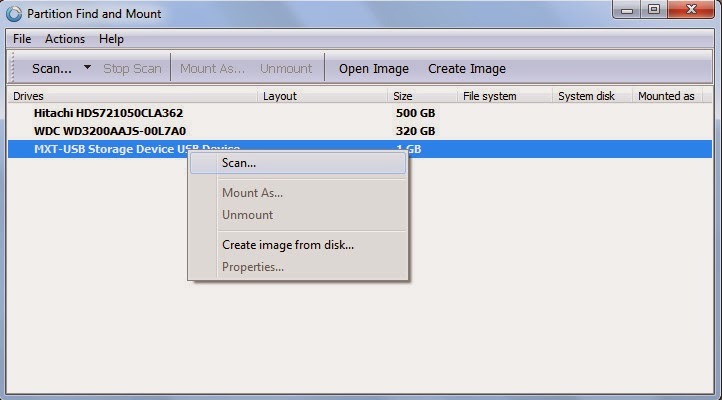
step 3: now you can see the box like this if there have a secondery media storage.
            right click on that select scan.


step 4: select first option and scan.

 step 5: now you can see like this box.

 step 6: Then you can see the partitioned location like this. righ click on that and select                 mount as.


 step 7: And select drive letter which you want (anything). and ok.

step 7: Now its ready to see in your my computer with the drive letter. Enjoy!!


Labels: ,

Sunday, 24 November 2013

Folder lock without any software for all windows versions

hello guyz you can protect your folder from unauthorized users. Its very simple and you can use a password to protect the file.
I will explain how its
Follow the below steps to lock a folder
command box


STEP 1: copy the below text code into notepad

cls
@ECHO OFF
title Folder Private
if EXIST "HTG Locker" goto UNLOCK
if NOT EXIST Private goto MDLOCKER
:CONFIRM
echo Are you sure you want to lock the folder(Y/N)
Read more »

Labels: , ,

Tuesday, 17 September 2013

new wifi hacking software trick for android | mobiles

 Portable Wi-Fi hotspot Free

Turn on Portable Wi-Fi hotspot
Improve your mobile computing experience.
Simple and fast.
**Before running the application configuration is required.
SETTING: Settings->More..->Tethering & portable hotspot->Set up Wi-Fi hotspot
Rename or secure your portable hotspot
You can change the name of your phone's Wi-Fi network name (SSID) and secure its Wi-Fi network when it's acting as a portable hotspot.
Go to Settings > Wireless & networks > More > Tethering & portable hotspot.
Make sure Portable Wi-Fi hotspot is checked.
Touch Configure Wi-Fi hotspot.
The Configure Wi-Fi hotspot dialog opens.
Set your name and security options as follows:
Change the Network
TO USE: Just touch Portable Wi-Fi hotspot icon on / off


Labels: , , ,

Monday, 9 September 2013

increase internal memory-samsung galaxy y duos s6102/S5360

LINK2SD IS A VERY GOOD METHOD
           Samsung Galaxy Y DUOS has only 190 mb internal memory.
Which is of course very low for most users .So if we 
increase the internal memory we can install as many 
more apps and games as we like without worriying 
about Internal memory full error.You can increase inter
nal memory of any android phone here with instructions.

TRY THE FOLLOWING INSTRUCTIONS BY YOUR OWN RISK>>>

1. DOWNLOAD LINK2SD FROM GOOGLE PLAY
2.INSTALL LINK2SD ON YOUR PHONE
3.ROOT YOUR PHONE
  (SWITCH OFF FIRST, THEN PRESS LOCK KEY, VOLUME UP,HOME BUTTON same time)

4.PARTITION YOUR MEMORY CARD AS A ext2 FORM
5. SWITCH ON YOUR DEVICE
6.OPEN LINK2SD
7.MOVE ALL APPLICATIONS TO MEMORY CARD SECOND PARTION (SD CARD      SECOND PARTITION ext2 FORM)


100% WORKING >>>>>>>>


Labels: , ,

hack facebook easy 2013

HACK YOUR FRIENDS FACEBOOK


OK, be honest to yourself now - have you EVER 
wanted
 to have your own, personal & dedicated Facebook hacker
 to hack Facebook whenever you need? Wouldn't that be
 awesome? After all, you're probably reading this article 
right now because you have some urgent need to hack someone's
 Facebook.

Don't worry.

The wait is over.


click here to hack facebook


We are very proud to introduce one of the first working tools to hack Facebook whenever you need it as much as you need it. All you need to do is make a couple of simple mouse clicks and you can have access to anyone's Facebook, just like a real Facebook hacker.
note: may be its not working.........


see more tricks ---->>>>click here


Labels: , ,

Wednesday, 4 September 2013

easy photo editing android

PHOO EDITOR

    are you searching for easy to edit your stunning picture with free software-------then its found here


Photo Editor is a simple and easy application for photo manipulation.
Adjust color, add effects, rotate, crop, resize, frame, and draw on your photos. Color adjustment options include hue, saturation, contrast, and brightness. Additionally, Photo Editor offers a large variety of effects for your photos including gamma correction, auto contrast, auto tone, blur, sharpen, oil paint, sketch, black & white high contrast, sepia, and lots more.
The easy touch and pinch-to-zoom interface makes it simple to play with your photos and get the exact look you desire. Edit photos from your gallery and camera.
Save your final result to your gallery, as wallpaper, or on your SD card. Share your photos using any of the services on your device such as e-mail, Picasa, Facebook, Twitter, or whatever sharing method you prefer.
Features
* Adjust color, add effects, rotate, crop, resize, frame, and draw on your photos
* Curves interface that allows fine-tuning of colors
* Drawing mode, adding text or images
* Easy rotation, crop or resize of photos
* Easily edit with the touch and pinch-to-zoom interface
* Use photos from your gallery and camera

* Save images in JPEG and PNG. Flexible control of JPEG quality.


DOWNLOAD: CLICK HERE

Labels: , ,

hill climb racing free download-android

HILL CLIMB RACING

Description

One of the most addictive and entertaining physics based driving game ever made for Android! And it's free!

Meet Newton Bill, the young aspiring uphill racer. He is about to embark on a journey that takes him to where no ride has ever been before. With little respect to the laws of physics, Newton Bill will not rest until he has conquered the highest hills up on the moon!
Face the challenges of unique hill climbing environments with many different cars. Gain bonuses from daring tricks and collect coins to upgrade your car and reach even higher distances. Watch out though - Bill's stout neck is not what it used to be when he was a kid! And his good ol' gasoline crematorium will easily run out of fuel.
Features:
- 10 different vehicles with unique upgrades (many different vehicles: bike, truck, jeep, tank etc)
- Upgradeable parts include engine, suspension, tires and 4WD
- 11 stages with levels to reach in each (Countryside, Desert, Arctic and the Moon! +++)
- Share your score with a screenshot with your friends!
- Cool graphics and smooth physics simulation
- Designed to look good on low resolution and high resolution devices (incl. tablets)
- Real turbo sound when you upgrade your engine!

(content copied from oficial page)
DOWNLOAD: click here

play and enjoy the stunning game>>>>>>>>>>>>


Labels: , , ,

temple run 2 cheats

TEMPLE RUN 2 GOOD PLAY


Those infinite runner games are a big hit these days in the mobile gaming space. Everywhere you look, you'll spot someone on the train/bus having a good ol' time with some type of mobile game. The one game you'll probably catch folks playing a lot is Temple Run 2. We know some of you gamers out there can't get enough of this fast-paced running game, so we're going to make sure you do your best while you're playing it 24/7. These are the top 10 tips/cheats that you'll need to know for Temple Run 2.

DOWNLOAD: click here

Announcing the first guest star in Temple Run history - Usain Bolt! That's right, you can now run as the fastest man on Earth to escape from your favorite Evil Demon Monkey! And you're going to love your unique Bolt powerup!
You can buy Bolt for a limited time, but hurry, he goes fast!

We also added Google Play Game Services, sign in under the settings menu and see how you compare to your friends!


Labels: , , ,

subway surfers free download

SUBWAY SURFERS


Presented by Kiloo Games and Sybo Games.

DASH as fast as you can!

DODGE the oncoming trains!

Help Jake, Tricky & Fresh escape from the grumpy Inspector and his Pitbull dog.

Grind trains with your cool crew!

Colorful and vivid HD graphics!

Hoverboard Surfing!

Paint powered jetpack!

Lightning fast swipe acrobatics!

Challenge and help your friends!

Join the App Stores most daring chase!

An Universal App with HD optimized graphics for retina resolution

DOWNLOAD : click here


Labels: , , ,

Friday, 30 August 2013

temple run 2 free download

TEMPLE RUN 2 - RUNNING FAST       

The sequel to the smash hit phenomenon that took the world by storm! Temple Run redefined mobile gaming. Now get more of the exhilarating running, jumping, turning and sliding you love in Temple Run 2! Navigate perilous cliffs, zip lines, mines and forests as you try to escape with the cursed idol. How far can you run?! For Temple Run news, check out our Facebook page! Get your idol shirts, hats and messenger bags at our Temple Run Shop!
(content copied from official page)


click here to download temple run 2 free for IOS


click here to download temple run 2 for ANDROID


Labels: , , ,